
 📖Chuyên sâu
How to Structure and Organize a React Application
Folder trees are the least important part of the answer. The decisions that keep a React codebase workable — where state lives, what a key means, which contexts are separate, where the boundaries go — are measurable, so this guide measures them: 15 renders versus 3, and the six-way comparison that follows from it.
CuongThai
30 tháng 7, 2026 · 26 phút đọc · 1584 lượt xem
Ask ten React developers how to structure an application and you get ten folder trees. That's because folder trees are the least important part of the answer, and the easiest to have an opinion about. The decisions that actually determine whether a codebase stays workable are about where state lives, where the seams are, and what re-renders when something changes — and unlike folder names, those are measurable.
So this guide measures them. I built a lab that mounts real component trees in Node with jsdom, counts every render with a counter inside each component body, and drives updates through real DOM events wrapped in act(). Every number below came out of that.
react 19.2.8 · react-dom 19.2.8 · jsdom 29.1.1 · Node 22.21.0
Two of the measurements contradicted advice I was about to repeat, and one of them is advice you have almost certainly been given.
The folder question, answered quickly so we can move on
There are two layouts in practice. Type-based groups files by what they are:
src/
  components/    Button.tsx  Modal.tsx  InvoiceRow.tsx  ChartLegend.tsx
  hooks/         useAuth.ts  useInvoices.ts  useChartData.ts
  utils/         format.ts   money.ts        dates.ts
  api/           invoices.ts users.ts        billing.ts
Feature-based groups files by what they're for:
src/
  features/
    billing/     InvoiceRow.tsx  useInvoices.ts  api.ts  money.ts
    charts/      ChartLegend.tsx useChartData.ts api.ts
  shared/
    ui/          Button.tsx  Modal.tsx
    lib/         dates.ts    http.ts
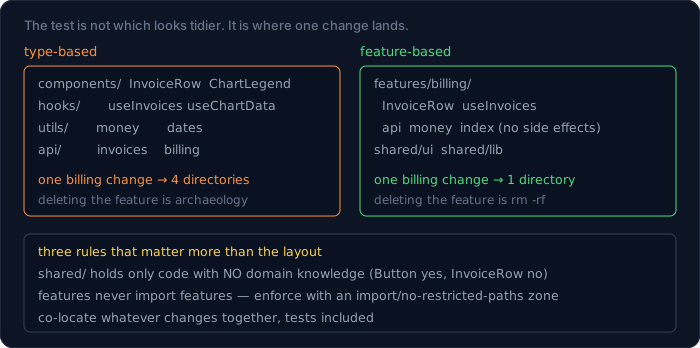
The argument for feature-based isn't aesthetics, it's the diff. A change to billing touches one directory instead of four. Deleting a feature is rm -rf instead of an archaeology exercise. And the boundary makes an unhealthy import visible: if features/charts imports from features/billing, that's a coupling you can see in a code review, and can enforce with a lint rule:
{
  "rules": {
    "import/no-restricted-paths": ["error", {
      "zones": [{
        "target": "src/features/charts",
        "from": "src/features/billing"
      }]
    }]
  }
}
Three rules that matter more than the layout itself:
shared/is for things with no domain knowledge. AButtonbelongs there; anInvoiceRownever does, no matter how reusable it looks.- Features may not import each other. If they need to, the shared piece moves to
shared/, or one feature exposes a small public surface deliberately. - Co-locate anything that changes together — component, hook, types, tests, and the API call all in the same directory. The test file next to the component gets updated; the one in a mirror-image
__tests__tree does not.
Type-based is fine for a small app, and every large app I've seen eventually grows feature folders anyway, usually by hand and halfway. That's the whole argument.
Barrel files: measured, not assumed
The advice everyone repeats: don't use index.ts barrels, they bloat your bundle because importing one thing pulls in everything. I believed it. Here's the measurement.
// src/features/billing/index.js
export { Invoice } from './Invoice.js';
export { Chart } from './heavy-chart.js';   // 12,922 B of source
export { Pdf } from './heavy-pdf.js';       // 14,347 B of source
Two entry points that use exactly one export, bundled and minified with esbuild:
// deep
import { Invoice } from './billing/Invoice.js';
// barrel
import { Invoice } from './billing/index.js';
entry-deep     49 B   · chart-row: 0   pdf-font: 0
entry-barrel   49 B   · chart-row: 0   pdf-font: 0
Byte-identical. 27 KB of unused source in the barrel's other two modules cost nothing at all, because both modules are side-effect free: a const holding a literal array and a function that reads it. The bundler proved nothing observable happens on import and dropped them.
Now the version that does cost something. One line at the top of the barrel:
// src/features/billing/index-sideeffect.js
console.log('billing module loaded');
export { Invoice } from './Invoice.js';
export { Chart } from './heavy-chart.js';
export { Pdf } from './heavy-pdf.js';
entry-barrel-sideeffect 86 B
And an earlier version of my test, where the heavy modules built their arrays with Array.from(...) at module top level instead of using literals:
entry-deep     49 B   · chart-row: 0
entry-barrel  192 B   · chart-row: 1   ← the module was kept
There's the real rule. A barrel is free when everything behind it is side-effect free, and expensive when something behind it does work on import. Top-level Array.from(...), a console.log, a CSS import, a global registration, an analytics call — any of those make the module unremovable, and then the barrel really does drag it in.
Which means the actionable advice is not "avoid barrels". It's:
- Keep module top-level scope free of work. Declarations, not statements.
- Declare
"sideEffects": falsein thepackage.jsonof any package you publish, and list the exceptions honestly if there are any. - If a barrel must import CSS or register something, that's a strong signal it should be an explicit
init()call instead of an import side effect.
The one cost barrels do impose is on your dev server and IDE: resolving a barrel means parsing everything it re-exports, which is why large monorepo barrels feel sluggish in editors even when the shipped bundle is fine. That's a build-time complaint, and it's the sort of thing the webpack guide shows how to measure.
Where state lives is the most important structural decision
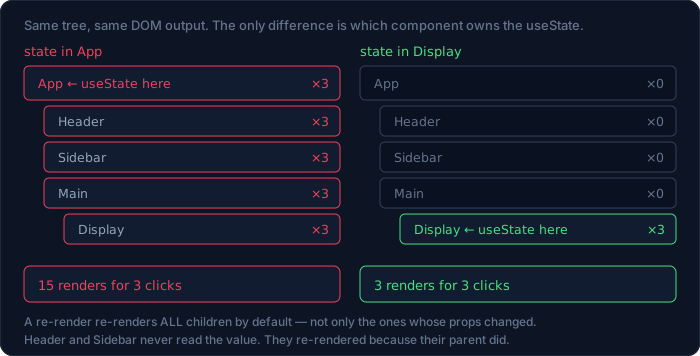
This is the one that decides how a React app feels, and it's completely measurable. Same component tree twice — App with a Header, a Sidebar, and a Main containing a Display — with a counter in each body:
function Header() { count('Header'); return <header>header</header>; }
Variant A — state at the top, passed down as props:
function App() {
  count('App');
  const [n, setN] = useState(0);
  return (
    <div>
      <Header /><Sidebar />
      <Main n={n} inc={() => setN(x => x + 1)} />
    </div>
  );
}
Variant B — state where it's used:
function Display() {
  count('Display');
  const [n, setN] = useState(0);
  return <span>n={n}<button onClick={() => setN(x => x + 1)}>+</button></span>;
}
Three clicks on the button in each:
state in APP (high)
  mount    : {App:1, Display:1, Header:1, Main:1, Sidebar:1}
  3 clicks : {App:3, Display:3, Header:3, Main:3, Sidebar:3}

state in DISPLAY (low)
  mount    : {App:1, Display:1, Header:1, Main:1, Sidebar:1}
  3 clicks : {Display:3}
15 component renders versus 3. Identical DOM output, identical user-visible behaviour. The only difference is which component owns the useState.
The mechanism is worth stating plainly, because it's the single fact that explains most React performance questions: when a component re-renders, React re-renders all of its children by default. Not "children whose props changed" — all of them. Header and Sidebar don't receive n, don't read it, and don't care about it; they re-rendered three times each because their parent did.
So the structural rule is: push state down until it's owned by the lowest component that needs it, and lift it only when a second component genuinely needs the same value. "Lift state up" is good advice for correctness and a performance decision every time you follow it.
Three practical corollaries:
- A form's field state belongs in the field, or in a form-level object if fields interact. Not in the page.
- "Is this modal open" belongs to whatever renders the modal, not to
App. - When you do have to lift, consider lifting the setter only. Passing
incdown and keepingnlow is often possible and keeps the render local.
Forms are where the render count becomes visible
The state boundary sounds abstract until you type into an input. A controlled input re-renders its owner on every keystroke, by design — that's what makes the value and the DOM agree.
function Controlled() {
  count('Controlled');
  const [v, setV] = useState('');
  return <input value={v} onChange={e => setV(e.target.value)} />;
}
controlled   : 5 keystrokes → 5 renders · final value "hello"
uncontrolled : 5 keystrokes → 0 renders · final value "hello"
The uncontrolled version keeps the value in the DOM and reads it with a ref:
function Uncontrolled() {
  count('Uncontrolled');
  const ref = useRef(null);
  return <input ref={ref} defaultValue="" />;
}
Same final value, zero renders. This is not an argument for uncontrolled inputs everywhere — controlled inputs are what let you validate as the user types, format on the fly, or disable a submit button. It's an argument about where the input lives: five renders of a <Field> component is nothing, and five renders of an entire page containing a chart is a laggy form. Which happens whenever the form's state sits at the page level.
Two structural options, in order of preference:
- Keep field state in the field. A
<TextField>that owns its own value and reports upward on blur or on submit re-renders only itself. - Put the form's state in a form component, with the page above it untouched. The page can pass content in through
children, which — as measured below — costs nothing.
For a form with real interdependencies (a total that depends on three fields, validation across fields), one owner is correct and the answer is to make that owner small.
Derived state is the most common structural mistake
If a value can be computed from props or other state, storing it in useState and syncing it with an effect is strictly worse. Measured, with a component that stores the total:
function StoredDerived({ rows }) {
  count('StoredDerived');
  const [total, setTotal] = useState(0);
  useEffect(() => { setTotal(rows.reduce((s, r) => s + r, 0)); }, [rows]);
  return <span>total={total}</span>;
}
versus the one that just computes it:
function ComputedDerived({ rows }) {
  count('ComputedDerived');
  const total = rows.reduce((s, r) => s + r, 0);
  return <span>total={total}</span>;
}
stored in state + useEffect
  mount        : 2 renders · "total=6"
  props change : 2 renders · "total=15"

computed during render
  mount        : 1 render · "total=6"
  props change : 1 render · "total=15"
Twice the renders for the same output, and that's the cheap part of the cost. The expensive part is the frame in between: on the first of those two renders, total still holds the old value while rows holds the new one. The component is briefly wrong on screen and briefly wrong in any test that doesn't wait. Multiply that by a chain of two or three synced values and you have a component whose state is inconsistent with its props for a render at a time, which is exactly the class of bug that produces "it flashes the wrong number".
The rule is short: useState for what the user or the server tells you; a plain const for anything you can derive. Wrap the derivation in useMemo only if a measurement says the computation is slow — and remember from above that useMemo reduces computations, not renders.
Keys are identity, not order
key looks like a lint requirement. It is actually how React decides which component instance a list item is, and getting it wrong moves state between rows. Each row here owns a counter:
function Row({ label }) {
  const [n, setN] = useState(0);
  return <li><button onClick={() => setN(x => x + 1)}>{label}={n}</button></li>;
}
I clicked beta's button twice, then inserted a new item at the front of the list.
key = index
  before insert : ["alpha=0", "beta=2",  "gamma=0"]
  after insert  : ["zulu=0",  "alpha=2", "beta=0", "gamma=0"]
  the "=2" state now belongs to: alpha

key = id
  before insert : ["alpha=0", "beta=2",  "gamma=0"]
  after insert  : ["zulu=0",  "alpha=0", "beta=2", "gamma=0"]
  the "=2" state now belongs to: beta
With key={index}, the state followed position 1, which after the insert is alpha. Beta's two clicks now belong to a different row. With key={item.id}, the state followed the item, which is what every user expects.
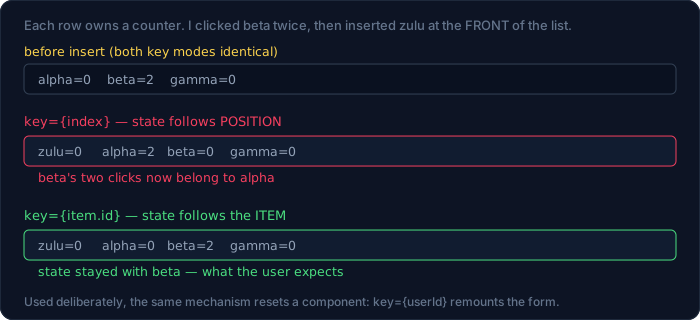
The same mechanism, used deliberately, is one of React's best tools: changing a key resets a component, because a new key means a new instance.
{/* remount the form when the user changes — clears all internal state */}
<UserForm key={userId} user={user} />
That's cleaner than a useEffect that resets six pieces of state when a prop changes, and it can't drift out of sync with the fields.
Two rules: index keys are safe only for lists that never reorder, insert, or delete; and a key needs to be unique among siblings, not globally.
The children prop is the cheapest optimisation in React
Everyone reaches for memo first. There's a structural fix that costs nothing and needs no hook. An Expensive component that is not wrapped in memo:
function Shell({ children }) {
  count('Shell');
  const [n, setN] = useState(0);
  return (
    <div>
      <button onClick={() => setN(x => x + 1)}>n={n}</button>
      {children}
    </div>
  );
}

function App() {
  count('App');
  return <Shell><Expensive /></Shell>;
}
Two clicks on Shell's own button:
{Shell: 2}
Expensive rendered 0 times — with no memo at all
Shell's state changed twice and Expensive never re-rendered. The reason: children is a prop, and the element <Expensive /> was created by App, which did not re-render. Shell re-renders and hands React the same element object it already had, so React skips that subtree.
This is why "state down, content through props" is the composition rule that scales. The pattern generalises:
{/* instead of a provider that renders everything itself… */}
<ThemeShell>
  <Sidebar />
  <Main />
</ThemeShell>
Anything passed in is insulated from the shell's state by construction, not by a memo you have to remember to keep correct.
Context: one value changes, every consumer re-renders
Context is where "structure" and "performance" stop being separate topics. A provider holding two unrelated values, with all three children wrapped in memo:
function Provider() {
  const [theme, setTheme] = useState('dark');
  const [user] = useState('mai');
  const value = { theme, user };        // new object every render
  return (
    <Ctx.Provider value={value}>
      <button onClick={toggleTheme}>toggle</button>
      <ReadsTheme /><ReadsUser /><Unrelated />
    </Ctx.Provider>
  );
}
Toggle the theme once:
{Provider: 1, ReadsTheme: 1, ReadsUser: 1}
Unrelated rendered 0 times
Two findings in three lines. Unrelated is wrapped in memo and doesn't read the context, so it was skipped — memo works. ReadsUser is also wrapped in memo, doesn't use theme, and re-rendered anyway. memo cannot protect a context consumer, because useContext subscribes the component directly; when the provider's value is a new object, every consumer is notified regardless of which field it reads.
The structural fix is to split the context along the lines its values change on:
<ThemeCtx.Provider value={theme}>
  <UserCtx.Provider value={user}>
    …
  </UserCtx.Provider>
</ThemeCtx.Provider>
toggle theme once → {Provider: 1, ReadsTheme: 1}
ReadsUser rendered 0 times
ReadsUser is now genuinely isolated. Two smaller contexts beat one convenient object, and the rule of thumb follows: one context per thing that changes at a different rate. Theme changes when a user clicks a toggle. The authenticated user changes at login. A live cart total changes constantly. Those do not belong in one provider.
If splitting isn't practical, useMemo on the value at least stops re-renders caused by the provider's own unrelated re-renders:
const value = useMemo(() => ({ theme, user }), [theme, user]);
That's a real improvement and it does not fix the measurement above — when theme changes, the memo correctly produces a new object, and ReadsUser re-renders again. Only splitting fixes that.
An external store does better than either
For state that changes often, or that many unrelated components read slices of, context is the wrong shape. useSyncExternalStore lets a component subscribe to a slice, and React re-renders only the subscribers whose slice changed. Here's a store in nine lines, no library:
const store = {
  state: { theme: 'dark', user: 'mai' },
  listeners: new Set(),
  subscribe(fn) {
    store.listeners.add(fn);
    return () => store.listeners.delete(fn);
  },
  set(patch) {
    store.state = { ...store.state, ...patch };
    store.listeners.forEach(f => f());
  },
};

const useSlice = pick =>
  useSyncExternalStore(store.subscribe, () => pick(store.state));
const ReadsTheme = () => <span>{useSlice(s => s.theme)}</span>;
const ReadsUser  = () => <span>{useSlice(s => s.user)}</span>;
Change the theme once:
{ReadsTheme: 1}
App rendered 0 times · ReadsUser rendered 0 times · DOM "togglelightmai"
One component re-rendered. Not the provider, not the sibling consumer, not the tree in between — because there is no provider in the tree at all, and the subscription is per-slice. Compare that with the context measurements above: three components for the single-context version, two for the split-context version, one here.
That measurement is the honest case for Zustand, Jotai, Redux Toolkit or a hand-rolled store: not "context is slow" in the abstract, but that a store subscribes at the leaf while a provider notifies a subtree. The trade-off is real too — a store lives outside the React tree, so it doesn't reset on unmount, isn't scoped per-route, and is easier to leak between tests. Use context for things that are genuinely tree-scoped (theme, locale, the current form), and a store for things that are app-scoped and change often.
memo, useMemo, useCallback: what each one actually stops
They're often applied interchangeably, and they do different jobs. Measured, with a memo-wrapped child:
const Child = memo(function Child() { count('Child'); return <span/>; });

function Parent() {
  count('Parent');
  const [n, setN] = useState(0);
  return (
    <div>
      <button onClick={() => setN(x => x + 1)}>n={n}</button>
      <Child cb={() => {}} cfg={{ a: 1 }} />
    </div>
  );
}
Two clicks, with unstable props and then with stable ones:
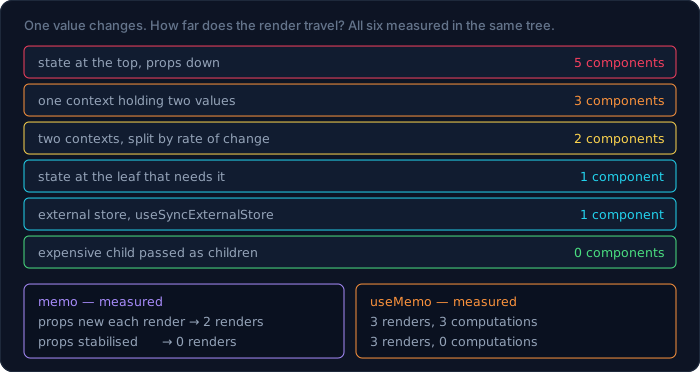
props NEW each render               · 2 clicks → {Child: 2, Parent: 2}
props STABLE (useCallback + useMemo) · 2 clicks → {Parent: 2}
memo compares props with Object.is. A fresh arrow function and a fresh object literal are never equal to the previous ones, so memo re-renders every time and you've paid for a comparison that can't succeed. memo on a component with object or function props does nothing unless those props are also stabilised. That's why these three tend to arrive as a set, and why adding memo alone so often changes nothing.
useMemo is a different tool that people expect to prevent renders. It doesn't — it prevents recomputation:
const total = useMemo(() => compute(rows), [rows]);
computed inline in the body · 3 clicks → renders 3, computations 3
useMemo(() => …, [rows])   · 3 clicks → renders 3, computations 0
Same three renders either way. The component still ran three times; the expensive function ran zero further times. If your goal is fewer renders, useMemo is the wrong hook — the right answers are the state boundary and the children pattern above.
A rule for all three: reach for them when a measurement says to. React 19's compiler-assisted builds and the cheapness of most renders mean a codebase full of prophylactic memo is usually slower to read and no faster to run.
Custom hooks organise code, not renders
A frequent assumption: extracting logic into a custom hook makes a component "lighter". It moves the code; it changes nothing about rendering. Same counter, written twice:
function Inline() {
  count('Inline');
  const [n, setN] = useState(0);
  return <button onClick={() => setN(x => x + 1)}>n={n}</button>;
}

const useCounterLogic = () => {
  const [n, setN] = useState(0);
  return { n, inc: () => setN(x => x + 1) };
};

function WithHook() {
  count('WithHook');
  const { n, inc } = useCounterLogic();
  return <button onClick={inc}>n={n}</button>;
}
inline : 2 clicks → {Inline: 2}
hook   : 2 clicks → {WithHook: 2}
Identical. A hook's state belongs to the component that calls it, so useState inside useCounterLogic is useState inside WithHook — one instance per calling component, not one shared instance. Two components calling the same hook get two independent states, which is worth being explicit about because it's the most common misreading of custom hooks: they are not stores.
What custom hooks are good for is structural: they give a name to a piece of behaviour, let you test it in isolation, and keep the component body readable. Use them for that, and reach for a store (or a context, or a query library) when you actually need shared state.
Batching, bail-outs and StrictMode
Three behaviours worth knowing before you go optimising renders that don't exist.
Multiple setState calls in one handler produce one render:
onClick={() => { setA(a + 1); setB(b + 1); setC(c + 1); }}
3 setState in one handler → 1 render · DOM "111"
React batches updates within an event, and since React 18 that includes updates in promises and timeouts. So a handler that touches four pieces of state is not four renders, and splitting state into several useState calls costs nothing at update time.
Which means useReducer is a structural choice, not a performance one. One dispatch that changes three fields:
const reducer = (st, a) => ({ ...st, ...a });
const [s, dispatch] = useReducer(reducer, { a: 0, b: 0, c: 0 });
1 dispatch changing 3 fields → 1 render · DOM "111"
One render — the same as three batched setState calls. So pick useReducer when the state transitions have names worth writing down (ADD_ITEM, APPLY_COUPON) or when updates depend on the previous state in non-trivial ways, and pick several useState calls when the values are independent. Neither is faster.
Setting the same value renders zero times:
onClick={() => setN(0)} // n is already 0
2 clicks → 0 renders
React compares with Object.is and bails out before rendering. Which is also the trap for object state: setUser({...user}) with identical contents is a new object, so it always renders.
StrictMode calls your components twice in development:
without StrictMode → Body called 1 time on mount
with StrictMode    → Body called 2 times on mount
This is deliberate and development-only: double-invoking renders and effects surfaces side effects that don't belong in a render body. If you're counting renders to judge a performance fix, count them without StrictMode — or you'll chase a factor of two that doesn't ship. And if a component breaks under StrictMode, it has a real bug: something in its render body is mutating state outside React.
And it's not only the render that doubles. Counting the effect and its cleanup separately:
useEffect(() => {
  count('effect');
  return () => count('cleanup');
}, []);
without StrictMode → {render: 1, effect: 1}
with StrictMode    → {render: 2, effect: 2, cleanup: 1}
React mounts the effect, runs its cleanup, then mounts it again. That sequence is the point: it proves your effect can survive being torn down and re-run, which is the same requirement Fast Refresh and future React features impose. An effect that breaks here is an effect with a missing cleanup, and the cleanup is what the next section is about.
Effects lose races, and structure is the fix
The most expensive bug in a data-fetching component is not a missing loading state. It's two requests in flight and the slow one landing last. Two components, identical except for four characters:
function Profile({ id }) {
  const [name, setName] = useState('');
  useEffect(() => {
    fetchUser(id).then(n => setName(n));      // unguarded
  }, [id]);
  return <span>{name}</span>;
}
useEffect(() => {
  let alive = true;
  fetchUser(id).then(n => { if (alive) setName(n); });
  return () => { alive = false; };            // guarded
}, [id]);
I made id: 1 take 30 ms and id: 2 take 5 ms, mounted with id: 1, then immediately switched to id: 2:
unguarded → current id is 2, DOM shows "user-1"
guarded   → current id is 2, DOM shows "user-2"
The unguarded version renders the wrong user's data with no error, no warning and nothing in the console. It resolves in the right order most of the time on a fast connection, which is what makes it a bug that ships. The cleanup function is not politeness — it's the only thing that tells the stale response it no longer speaks for the component.
Three structural conclusions:
- Every effect that sets state after an await needs a cleanup, whether an
aliveflag or anAbortController:
useEffect(() => {
  const ac = new AbortController();
  fetch(`/api/users/${id}`, { signal: ac.signal })
    .then(r => r.json()).then(setUser)
    .catch(e => { if (e.name !== 'AbortError') setError(e); });
  return () => ac.abort();
}, [id]);
- This is the argument for a query library, not performance. TanStack Query, SWR or your framework's loader already handle cancellation, deduplication, caching and stale responses. Hand-written
useEffectfetching means re-solving all four in every component, and the race is the one everybody forgets. - Keep fetching at the feature boundary. One
useInvoices()hook per feature, used by the components that need it, is testable and cancellable in one place. Fetching scattered through leaf components multiplies the number of places this bug can hide.
Server rendering shows you your tree
renderToString is a useful structural tool even in an app that doesn't do SSR, because it renders your tree once, in Node, with no browser and no DOM to distract you:
import { renderToString } from 'react-dom/server';
const html = renderToString(<Page />);
<div class="page"><article><h2>card 1</h2><em>new</em></article>
<article><h2>card 2</h2><em>new</em></article></div>

renders: {Page: 1, Card: 2, Badge: 2}
Each component ran exactly once per instance. That's the shape of your tree, printable and diffable in a test — and it's the cheapest way to catch a component that renders far more markup than you thought.
It also imposes a discipline that improves client code: nothing in a render body may touch window, document or localStorage, because on the server there aren't any. Components that pass that constraint are the same components that don't break under StrictMode and don't need useEffect to render correctly.
Error boundaries are a structural decision about blast radius
An error boundary catches a throw during render and replaces its subtree with a fallback. Where you put it decides how much of the page a single broken widget takes with it. Same boundary, same broken component, two placements:
{/* around the whole page */}
<Boundary><div><Safe /><Boom /></div></Boundary>

{/* around just the widget */}
<div><Safe /><Boundary><Boom /></Boundary></div>
boundary around the page   → DOM "caught: boom"
boundary around the widget → DOM "safecaught: boom"
In the first, Safe is gone — the whole page became the fallback. In the second, Safe still renders and only the widget is replaced. Same code, same error, different amount of product still working.
The minimal boundary is a class component, because there's still no hook for this:
class Boundary extends Component {
  state = { err: null };
  static getDerivedStateFromError(err) { return { err }; }
  componentDidCatch(err, info) { reportToSentry(err, info); }
  render() {
    return this.state.err
      ? <Fallback error={this.state.err} />
      : this.props.children;
  }
}
Where to put them, in order of value: one per route (so a broken page doesn't blank the shell), one around each independently-failing widget (a chart, an embed, a third-party component), and one at the root as a last resort. And note what boundaries do not catch: errors in event handlers, in setTimeout, or in promise rejections — those never pass through React's render, so they need their own handling.
A Suspense boundary is a real seam
lazy and Suspense are usually introduced as bundle-size tools. They're also the cleanest render boundary React gives you. A page with a sibling and one lazily-loaded child, with the module's resolution held open so the two states can be measured separately:
const Lazy = lazy(() => import('./LazyChild.js'));

const Page = () => (
  <div>
    <Sibling />
    <Suspense fallback={<Fallback />}><Lazy /></Suspense>
  </div>
);
while pending → DOM "siblingloading…"    · {Page: 1, Sibling: 1, Fallback: 1}
after resolve → DOM "siblinglazy-loaded" · {}
LazyChild rendered 1 time
The second line is the interesting one: zero renders outside the boundary. The module arriving swapped the fallback for the real child without re-rendering Page or Sibling. So a Suspense boundary is a place where a subtree can change independently of everything around it — which makes it worth placing deliberately rather than one per app:
- One per route is the baseline, and it's what pays for itself in bundle size — see the code-splitting measurements in the webpack guide.
- One around anything below the fold — a chart, a comments section, an editor. The page becomes interactive without waiting for them.
- Not around a component you always need immediately, where all you've bought is an extra network round trip and a layout shift.
One placement rule that matters: the fallback must not change layout, or you get a jump when the real content lands. A fallback with the same dimensions as its content is the difference between a loading state and a flicker.
Measuring this in a real app
Every number in this guide came from a counter in a component body, which is a technique that works in your app too:
const renders = new Map();
const count = name => renders.set(name, (renders.get(name) ?? 0) + 1);
For anything bigger, React ships the instrument. <Profiler> reports every commit inside it:
<Profiler id="tree" onRender={(id, phase, actualDuration, baseDuration) => {
  console.log(id, phase, actualDuration, baseDuration);
}}>
  <Tree />
</Profiler>
Mounting, then one click on a state button in a tree with three leaves:
commit reports: 2
  phase=mount   actualDuration=3.16ms  baseDuration=0.87ms
  phase=update  actualDuration=0.73ms  baseDuration=0.73ms
renders: {Tree: 2, Leaf: 6}
Three things to read there. There are two commits, not eight — the six Leaf renders happened inside those two commits, because rendering and committing are different things. actualDuration is the real time spent on that commit; on mount it's 3.16 ms against a baseDuration of 0.87 ms, because first-time work (creating DOM nodes) isn't in the baseline estimate. And on update they're equal, which is what "nothing was memoised" looks like: baseDuration is the cost of rendering the whole subtree without any bail-outs, so a gap between the two numbers is exactly the value your memo calls are producing.
That's the measurement to take before optimising, and the one to take again afterwards. The React DevTools profiler shows the same data as a flamegraph with a per-component breakdown, which is easier for finding which component is slow; <Profiler> is better for asserting in a test that a commit count didn't regress.
A structure worth keeping
Everything above, as a tree and a set of rules:
src/
  app/
    router.tsx           routes only — no business logic
    providers.tsx        one file that composes providers, in order
  features/
    billing/
      InvoiceRow.tsx     presentational, no data fetching
      InvoiceList.tsx    owns list state; renders rows
      useInvoices.ts     data fetching for this feature
      api.ts             endpoints for this feature
      money.ts           domain helpers
      index.ts           small PUBLIC surface, no side effects
    charts/
      …
  shared/
    ui/                  Button, Modal — zero domain knowledge
    lib/                 http.ts, dates.ts
    hooks/               useMediaQuery — generic only
- State lives at the lowest component that needs it. Lifting is a decision with a measured cost: 15 renders versus 3 in this guide's tree.
keyis identity. Item ids, never array index, for any list that can change. Use a changing key deliberately when you want a reset.- Pass content through
children. It insulates subtrees from a parent's state for free. - One context per rate of change. Not one context per app.
memoonly with stable props, and only when a count says to.- Barrels are fine; side effects at module top level are not.
- Features don't import features. Enforce it with a lint rule, because a convention nobody checks is a convention that's already broken.
Every measurement in one table
Same idea measured six ways — one value changes, how far does the render travel? The tree is a provider or parent with three children, two of which read the value:
| Approach | Components re-rendered |
|---|---|
| state at the top, props down | 5 of 5 (15 renders over 3 clicks) |
| state at the leaf that needs it | 1 of 5 (3 renders over 3 clicks) |
| one context holding two values | 3 (provider + both consumers) |
| two contexts, split by rate of change | 2 (provider + the one consumer) |
external store with useSyncExternalStore |
1 (the subscribing consumer only) |
expensive child passed as children |
0 (no memo needed) |
Read down that column and the shape of the advice appears. Nothing in it is a hook you sprinkle on afterwards — every row is a decision about where a value lives and who is allowed to see it change. That's what "structure" means in a React app, and it's why a folder tree is the last thing to argue about.
The one row people skip is the last. Passing a subtree in as children costs nothing, needs no dependency array to keep correct, and can't drift — and it beats every memoisation strategy in the table.
When not to restructure
Don't reorganise a working app because a guide told you to. A big-bang folder migration produces a diff nobody can review, invalidates everyone's mental model at once, and fixes no user-visible problem. Move one feature into features/ the next time you touch it, and let the layout arrive by attrition.
Don't optimise renders you haven't counted. The measurements here took a counter in a component body; that's about ten lines and it works in a real app too. React's profiler gives you the same information with flamegraphs. Both beat sprinkling memo and hoping — which, as the props measurement showed, can leave you with zero improvement and more code.
Most re-renders are fine. A component that returns a <span> re-rendering 15 times instead of 3 costs microseconds. The reason to care about the state boundary is not the microseconds — it's that a tree where everything re-renders is a tree where any future expensive child inherits the problem, and where you can no longer reason locally about what a click does.
Don't build an abstraction for the second use. Two similar components are cheaper than one component with a variant prop, five booleans and a comment explaining the combinations. Wait for the third.
And this site doesn't use most of what's above. Its frontend is Next.js with the app router, so routing and data fetching are the framework's, and the features/ question is settled by the file-system router. What transfers is the part this guide measured: where state lives, what key means, and which contexts are separate. Structure advice that ignores your framework's opinions is structure advice you'll fight.
What I got wrong measuring this
Two were my instrument, one was received wisdom, and the received wisdom is the useful one.
- "Barrel files bloat your bundle." Byte-identical: 49 B with a deep import, 49 B through a barrel re-exporting 27 KB of unused modules. The cost is entirely about side effects at module top level — my first version of the test used
Array.from(...)in module scope, which is exactly the case that does get dragged in (192 B, module retained). Same rule as thesideEffects: falseflag in the webpack guide, arriving from the other direction. - My first
keytest proved nothing. I typed into a controlled<input>by setting.valuedirectly and then read.valueback — which is reading back my own write. React 19's value tracker means a direct assignment never triggersonChange, so the component state never changed at all, and both key modes "lost" the value. Rewriting the test with a button that increments its own state made the difference show immediately. - The
act()warnings were coming from my teardown, not my events. I spent a few minutes suspecting jsdom event dispatch before noticing thatroot.unmount()is itself an update and needs wrapping. Exactly one warning per unmount, which is the kind of one-to-one correspondence that should have told me sooner where to look.
And one correction to how the numbers are usually described: memo does not protect a context consumer, and useMemo does not prevent a render. Both are widely written as if they do. The measurements — ReadsUser re-rendering once despite memo, and 3 renders with 0 recomputations under useMemo — are the clearest way I know to keep the two straight.
Cheat sheet
| Symptom | Structural cause |
|---|---|
| whole page re-renders on one input keystroke | state lives too high — push it down |
| list rows keep the wrong state after reorder | key={index} instead of key={id} |
| form doesn't reset when the record changes | give it key={record.id} |
memo changed nothing |
object/function props are new each render |
useMemo didn't reduce renders |
it never does — it reduces recomputation |
| unrelated context consumer re-renders | one provider holding several values; split it |
| expensive child re-renders with its parent | pass it as children instead |
| render count doubles in development | StrictMode — measure without it |
four setState calls, worried about four renders |
they batch into one |
| barrel import "pulls in everything" | only if a module does work at top level |
| a feature can't be deleted cleanly | features import each other; add a lint zone |
Where to go next
- How to Set Up webpack From Scratch — the other half of the barrel-file measurement: what tree shaking can and cannot prove, and why
sideEffects: falseis the flag that makes module boundaries free. - A Complete Guide to CSS Concepts and Fundamentals — the layer under your components: the cascade, stacking contexts, and why a
transformon a wrapper breaks a fixed-position modal. - Code Lab — graded React exercises: move the state boundary and watch the render count drop, fix a list that loses its state, split a context that shouldn't be one.
Bài liên quan
Chuyên sâu
Tôi tự xây một công cụ kiểu Jira: CT Work sau 21 ngày, 113 commit và mười lỗi đã trả giá
Nhật ký kỹ thuật của CT Work, công cụ quản lý dự án và đồ án sinh viên FPT dùng thật: kiến trúc và mã thật, AI agent qua MCP, số đo bằng lệnh (243 model, 68 trang, 1.514 ca test), mười lỗi đã sửa, mẹo dùng — và khi nào không nên dùng.

Chuyên sâu
AI Code: agent lập trình trong app desktop — cách dựng, lỗi đã gặp, và cách dùng cho đáng tiền
Agent lập trình trong app desktop CuongThai: kiến trúc và mã thật, 174 commit trong 48 ngày, 9 lỗi đã gặp và cách sửa, vì sao giá một lượt không nói lên giá trong vòng lặp gọi tool, mẹo chọn model — và khi nào KHÔNG nên dùng.

Chuyên sâu
Mã hoá cho lập trình viên: AES, RSA, chữ ký số — và vì sao đừng bao giờ tự viết thuật toán
Bắt đầu từ một file bài thi .dat mở ra không được: entropy 7,99 nói lên điều gì, vì sao dò khoá AES là bất khả thi về mặt VẬT LÝ chứ không phải "rất khó", AES khác RSA ra sao (đo thật: chênh ~1.520 lần). Kèm thí nghiệm ECB làm lộ nguyên hình ổ khoá và sáu vụ sập kinh điển.

Chuyên sâu
Có bao nhiêu loại cơ sở dữ liệu — và chọn cái nào cho việc gì
"SQL hay NoSQL" là phép chia sai: một vế là ngôn ngữ, vế kia nghĩa đen là "không phải cái kia". Bài này chia lại theo mô hình dữ liệu (11 loại), theo tải công việc và theo cách triển khai; giải thích ACID, mức cô lập, write skew, CAP bị hiểu sai ở đâu, B-tree so với LSM-tree; kèm cây quyết định, mười sai lầm hay gặp, và hồ sơ thật của chính trang này — 248 bảng trên một Postgres, một VPS 6GB.
Bình luận