
 📖Chuyên sâu
Shell Scripting for People Who Deploy Things
set -e ignores more than it catches, pipefail turns a working `producer | head` into exit 141, and a test-then-create lock let 10 of 40 processes all think they won. Measured on bash 3.2 (macOS) and bash 5.2 (Debian) side by side — including the one-line chain that failed a real deploy at the exact moment everything was healthy.
CuongThai
30 tháng 7, 2026 · 26 phút đọc · 1541 lượt xem
A deploy script is the program you are least able to debug. It runs on a machine you are not sitting at, at a moment when something is already going wrong, and its failure mode is not a stack trace — it is a script that kept going after the step that mattered failed, and reported success.
So this guide is about the parts of shell that fail quietly. Not syntax: the semantics that differ from what the code looks like it does. Every exit code, file count, race outcome and version difference below came out of a running shell.
macOS 26.5.2 — bash 3.2.57, zsh 5.9, no timeout(1), no flock(1)
debian bookworm — bash 5.2.15, dash
shellcheck 0.11.0 · and this site's own deploy.sh, 734 lines
Seven of those runs contradicted something I was about to write, including the single most repeated piece of shell advice on the internet. They're listed at the end.
set -e does less than its reputation
Start with the line at the top of nearly every deploy script:
set -euo pipefail
The -e is supposed to mean "stop on the first failure". It means something narrower, and the gap is where deploy scripts live. Here is a function that returns 1, called seven ways, each in its own process:
f() { return 1; }
f; echo REACHED
how f is called |
exit code | did REACHED print? |
|---|---|---|
f |
1 | no |
if f; then :; fi |
0 | yes |
f && echo x |
0 | yes |
f || echo x |
0 | yes |
! f |
0 | yes |
while f; do break; done |
0 | yes |
x=$(f) |
1 | no |
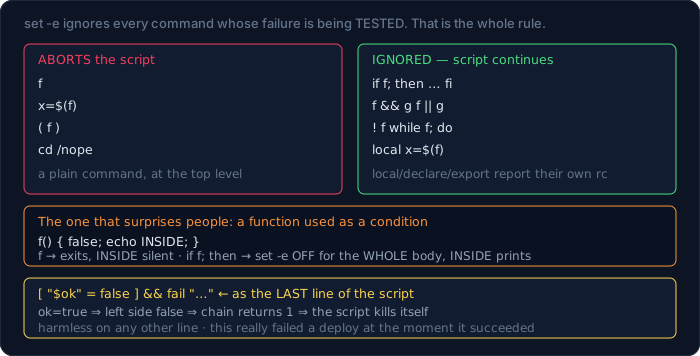
The rule the table is describing: set -e ignores any command whose failure is being tested. That's reasonable — if grep -q x file must not kill the script when the pattern is absent. But the consequence is not obvious at all:
f() { false; echo INSIDE; }
f            → exit 1,  INSIDE did not print
if f; then :; fi  → exit 0,  INSIDE PRINTED
Putting a function in a condition switches set -e off for the whole function body, recursively. Every line inside runs regardless of failures. A "check the environment" helper called as if check_env; then is a function where set -e has been silently disabled, and it will happily run all twelve of its steps after the first one fails.
The chain that killed a real deploy
This one is in this site's own deploy.sh, preserved as a comment above the fix:
frontend_ok=false
# … health-check loop that sets frontend_ok=true on success …
[ "$frontend_ok" = false ] && fail "Frontend did not respond"
Read it as English and it says "if the frontend is not ok, print a failure". Read it as shell and the last line of the script is an && chain, and when the frontend is healthy the left side is false, so the chain's exit status is 1, so the script exits 1 under set -e. The deploy failed at the exact moment everything worked.
[ 1 = 2 ] && echo hit                (last line)  → rc=1
[ 1 = 2 ] && echo hit; echo ok       (not last)   → rc=0
if [ 1 = 2 ]; then echo hit; fi                   → rc=0
[ 1 = 2 ] && echo hit || true                     → rc=0
Note the second row: the same chain is harmless when it isn't the last command, because the script's exit status comes from whatever runs after it. A bug that depends on which line of the file the statement sits on is a bug that survives review. The repo now carries the reason in the source:
# Must be `if`, NOT `[ … ] && fail …`: the script runs under `set -e`, and an
# && chain whose left side is false returns non-zero ⇒ the deploy kills itself
# at the exact moment the frontend is healthy.
if [ "$frontend_ok" = false ]; then
    fail "Frontend did not respond after 6 attempts"
fi
local throws the exit code away
f() { local x=$(false); echo REACHED; }
| assignment | exit code | reached? |
|---|---|---|
x=$(false) |
1 | no |
local x=$(false) |
0 | yes |
declare x=$(false) |
0 | yes |
export x=$(false) |
0 | yes |
readonly x=$(false) |
0 | yes |
local x; x=$(false) |
1 | no |
local, declare, export and readonly are commands. Their exit status is their own success, and assigning a variable basically always succeeds — so the failure of the command substitution inside is discarded before set -e ever sees it. This is why
local sha=$(git rev-parse HEAD)
is a landmine in a repo-less directory: sha is empty, the script continues, and something downstream tags an image myapp: with nothing after the colon. Declare first, assign second:
local sha
sha=$(git rev-parse HEAD)
And the two kinds of subshell do not behave the same, which surprised me enough to check it on both bash versions:
( false; echo INSIDE )        → rc=1, INSIDE did not print
out=$( false; echo INSIDE )   → rc=0, INSIDE ran, out=INSIDE
echo "$( false; echo INSIDE )"→ rc=0, printed INSIDE
out=$( false )                → rc=1
Identical on bash 3.2.57 and 5.2.15. A ( … ) subshell inherits set -e and aborts. A command substitution does not: it runs its body to the end and reports its last command's status. That status becomes the assignment's status, and set -e judges it at the top level — which is why out=$(false) aborts while out=$(false; echo INSIDE) doesn't.
Which sounds academic until the last command in the substitution is one that succeeds anyway. I tried four shapes; two abort and two don't:
V=$(cd /nope && cat VERSION)     → rc=1, aborts
V=$(cd /nope; cat VERSION)       → rc=1, aborts
V=$(cd /nope; echo fallback)     → rc=0, V=fallback
V=$(cd /nope; ls | head -1)      → rc=0, V=01-set-e.sh
The last one is the bad one, and I only found it by trying. The cd failed, ls listed the directory the script was already in, and V now holds a real-looking value from the wrong place. No error, no empty string to check for — just the wrong answer, confidently.
-u and -o pipefail, and what each one costs
pipefail changes which exit code a pipeline reports:
false | true                       default   → 0
false | true                       pipefail  → 1
true | false | true                pipefail  → 1
PIPESTATUS after false|true|false             → 1 0 1
Without it, a pipeline reports only its last command, so do_the_work | tee log reports tee's success and swallows everything. With it, any stage failing fails the pipeline. That's what you want — and it has two edges.
The first is grep, which exits 1 when it matches nothing. That is not an error; it is an answer.
set -e -o pipefail
grep zzz file | head -1
echo REACHED
without set -e -o pipefail  → REACHED
with    set -e -o pipefail  → rc=1, REACHED never printed
The fix is to say out loud that no-match is fine:
{ grep zzz file || true; } | head -1
The second edge is sharper, because the code is correct:
set -e -o pipefail
yes | head -1
set -e -o pipefail  → rc=141   (128 + 13, SIGPIPE)
set -e only         → rc=0, script continues
head exits after one line, yes gets SIGPIPE and dies from a signal, and pipefail reports that. A perfectly ordinary producer | head -n becomes fatal. So pipefail is right by default and you must know it is on, because the two idioms above are common and neither looks like a failure.
set -u is the least controversial of the three:
echo "$nope"          → rc=127, "nope: unbound variable"
echo "${nope:-fb}"    → fb
echo "${nope-}"       → (empty)
"$@" with no args     → fine
"$1" with no args     → rc=127, unbound
Except for one case, and this one splits macOS from every Linux server:
set -u
arr=()
echo "[${arr[@]}]"
bash 3.2.57 (macOS)      → arr[@]: unbound variable, script dies
bash 5.2.15 (debian)     → [] , script continues
An empty array is not an unset variable, and bash agreed with that from 4.4 onwards. macOS still ships bash 3.2 — the last GPLv2 release, from 2007 — so a script that iterates a possibly-empty array works on the server and dies on the laptop, or the reverse depending on where it was written. The portable spelling is "${arr[@]:-}", or ${arr[@]+"${arr[@]}"} if you need to preserve an empty expansion exactly.
trap, the only cleanup that actually happens
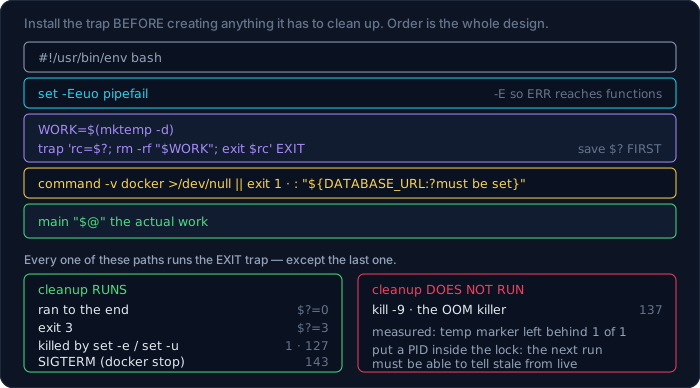
Every other cleanup strategy — "delete the temp dir at the end", "unset the maintenance flag after" — assumes the script reaches the end. trap ... EXIT doesn't:
| how the script ended | did the EXIT trap run? | $? inside it |
|---|---|---|
| ran to the end | yes | 0 |
exit 3 |
yes | 3 |
killed by set -e |
yes | 1 |
killed by set -u |
yes | 127 |
| SIGTERM from outside | yes | — |
kill -9 |
no | — |
That last row is measurable, and it matters because kill -9 is in a lot of runbooks. A script that creates a marker file and cleans it in an EXIT trap:
after SIGTERM: leftover markers = 0
after SIGKILL: leftover markers = 1
SIGKILL is not deliverable to the process; the kernel just stops it. Anything you were going to clean up stays. This is the argument for making your locks and temp files self-describing (a PID inside the lock, a timestamp in the name) rather than relying on cleanup alone — a stale lock from a kill -9 needs to be diagnosable by the next run.
Three details that bite in order of how often:
trap 'echo FIRST'  EXIT
trap 'echo SECOND' EXIT
→ prints SECOND only
A second trap on the same signal replaces the first. Two functions that each politely install their own cleanup will silently lose one. Accumulate into one handler, or install one trap that calls a list.
trap 'true; echo "rc=$?"' EXIT   # rc=0  — wrong
trap 'rc=$?; true; echo "rc=$rc"' EXIT   # rc=42 — right
$? inside the trap is live: the first command in the handler overwrites it. Capture it on the first line, before anything else.
set -e; trap 'echo ERR-TRAP' ERR
| where the failure happens | plain set -e |
set -eE |
|---|---|---|
| top level | ERR-TRAP | ERR-TRAP |
| inside a function | silent | ERR-TRAP |
| inside a subshell | silent | ERR-TRAP |
An ERR trap is not inherited by functions or subshells unless you add -E (errtrace). An error-reporting trap installed without -E reports exactly the failures that were already obvious.
Put together with mktemp -d, that's the shape worth memorising:
WORK=$(mktemp -d)
trap 'rc=$?; rm -rf "$WORK"; exit $rc' EXIT
ended normally → temp dir still there? no
ended in error → no
ended exit 9   → no
mktemp itself is one of the portability traps — the template rules differ:
macOS   mktemp -d              → /var/folders/…/T/tmp.c2sRvAvgEu
macOS   mktemp -d -t depl      → /var/folders/…/T/depl.Rq0q25DlDE
debian  mktemp -d              → /tmp/tmp.c4AEl5WP59
debian  mktemp -d -t depl      → mktemp: too few X's in template 'depl'
debian  mktemp -d -t deplXXXXXX→ /tmp/deplO9tttd
Plain mktemp -d is the spelling that works on both.
Subshells: where your variables go to die
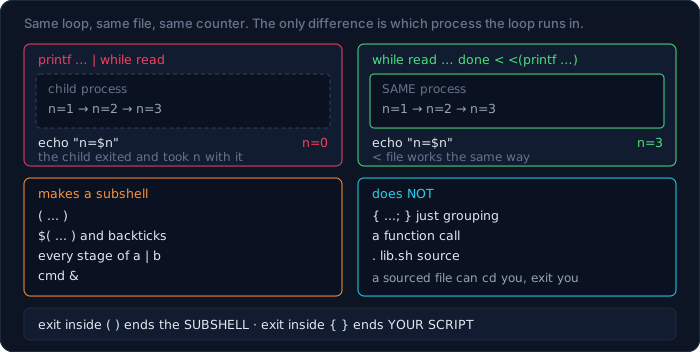
This is the single most reported "bash is broken" bug:
n=0
printf 'a\nb\nc\n' | while read -r l; do n=$((n+1)); done
echo "n=$n"
printf … | while read           → n=0
while read … done < <(printf …) → n=3
while read … done < file        → n=3
for l in $(printf …)            → n=3
Every stage of a pipeline runs in its own process. The loop counted to three and then that process exited, taking n with it. Process substitution < <(...) keeps the loop in the current shell, and so does a plain redirect from a file. Bash 4.2 added an opt-in fix:
shopt -s lastpipe # plus `set +m` in an interactive shell
bash 5.2  → supported, n=3
bash 3.2  → "shopt: lastpipe: invalid shell option name", n=0
Which is to say: not on macOS. Use < <(...).
What creates a subshell, and what doesn't:
( ... )— yes$( ... )and backticks — yes- every stage of
a | b— yes cmd &— yes{ ...; }— no, it's just grouping
Because of that, cd, exit and variable assignments inside ( ) do not escape:
cd /tmp; ( cd / ; echo "$PWD" ); echo "$PWD"   → / then /tmp
( echo in-sub; exit 7 ); echo "$?"             → in-sub then 7
{ echo in-block; exit 7; }; echo NEVER         → in-block, script exits 7
That last pair is worth staring at. exit in ( ) ends the subshell; exit in { } ends your script. They look almost identical in a diff.
The same boundary explains source:
bash lib.sh    → MODE=parent  PWD-changed=no    (child process)
. lib.sh       → MODE=sourced PWD-changed=yes   (same process)
A library of shell functions has to be sourced, and the corollary is that a sourced file can cd you somewhere, clobber your variables, and exit your script. set -e in a sourced file changes the caller's options too.
One more, quiet enough that it corrupts data rather than crashing:
x=$(printf 'a\n\n\n')
printf '%s' "$x" | wc -c        # → 1
Command substitution strips all trailing newlines. Usually a feature; occasionally it silently truncates a value you were about to hash or compare. The guard, if you need the bytes exactly:
x=$(printf 'a\n\n\n'; echo X); x=${x%X}
printf '%s' "$x" | wc -c        # → 4
[ ] and [[ ]] are not two spellings of the same thing
[ is a command, and its arguments are subject to word splitting like any other command's. [[ is shell syntax, parsed before expansion. That single difference produces all of the following:
x=""
[ $x = y ]     → bash: [: =: unary operator expected
[ "$x" = y ]   → fine
[[ $x = y ]]   → fine
x="a b"
[ $x = "a b" ]     → bash: [: too many arguments
[[ $x = "a b" ]]   → true
With [, an empty variable expands to nothing at all and the command receives two arguments instead of three. Quoting fixes it; [[ doesn't need it.
The one that creates a file when you meant a comparison:
[ a < b ]        # `<` is a REDIRECTION here — bash tries to read from `b`
[ a \< b ]       # escaped: true
[[ a < b ]]      # true
Pattern matching only exists in [[:
[[ $f == *.tar.gz ]]   → match
[ "$f" == *.tar.gz ]   → no match (literal string compare)
And regex, with the captures in BASH_REMATCH:
v=v1.20
[[ $v =~ ^v[0-9]+\.[0-9]+$ ]] && echo "${BASH_REMATCH[0]}"
→ v1.20
With one trap that costs an hour when you meet it: quoting the right-hand side turns the regex into a literal string.
s="a.c"; [[ $s =~ "a.c" ]] → matches "a.c" literally, not "abc"
Use [[ ]] when the script says #!/bin/bash. Use [ ] only when the shebang is /bin/sh and you mean it — on Debian that's dash, where [[, arrays and local behave differently or not at all.
Arrays, "$@", and everything that splits
Three elements go in. Count the arguments that come out:
a=("one two" "three" "")
count() { echo "argc=$#: [$1][$2][$3]"; }
count "${a[@]}"   → argc=3: [one two][three][]
count "${a[*]}"   → argc=1: [one two three ][][]
count ${a[@]}     → argc=3: [one][two][three]
The third row is the dangerous one: still three arguments, but a different three. one two split into two and the empty element vanished. Same count, wrong data — the kind of bug that passes a smoke test.
[*] joins with the first character of IFS, which is occasionally what you want:
IFS=- ; count "${a[*]}" → argc=1: [x-y-z]
Function arguments follow exactly the same rules:
outer "a b" c  →  inner "$@"  → argc=2
               →  inner "$*"  → argc=1
               →  inner  $@   → argc=3
"$@" is the only one that forwards arguments unchanged. There is no case where bare $@ is correct in a deploy script.
Globs that match nothing are left as literal text by default, which is how rm -rf ./*.tmp ends up trying to delete a file called *.tmp:
for f in /tmp/nope-*.txt              → [/tmp/nope-*.txt]   (one iteration!)
same, shopt -s nullglob               → zero iterations
same, shopt -s failglob               → bash: no match, script dies
Reading a file without mangling it
Four spellings, one file containing a line with leading spaces, a line containing a\tb, and a final line with no trailing newline:
while read line;         do …   # 2 lines: "leading spaces", "atb backslash"
while read -r line;      do …   # 2 lines, backslash preserved
while IFS= read -r line; do …   # 2 lines, leading spaces preserved
while IFS= read -r line || [ -n "$line" ]; do …   # 3 lines
Each addition fixes exactly one thing. -r stops backslash interpretation, IFS= stops leading and trailing whitespace being stripped, and || [ -n "$line" ] catches the final line when the file doesn't end in a newline — which is most files produced by printf, some editors, and every git show of a file without a trailing newline. wc -l on that file says 2, and it is not lying: there are two newline characters. There are three lines of text.
Filenames with spaces, counted five ways over a directory of three files:
for f in dir/*                      → 3
for f in $(ls dir)                  → 6      ← wrong
find … | while IFS= read -r         → 3
find … -print0 | while read -d ''   → 3
find … -print0 | xargs -0           → 3
$(ls) is not a stylistic preference. It produced six arguments from three files, and it will produce more the moment a filename contains a newline.
Your Mac is not the server
Before the flag differences, the blunt one — is the tool even installed?
| tool | macOS 26 | debian bookworm |
|---|---|---|
timeout |
missing | present |
flock |
missing | present |
nproc |
missing | present |
realpath readlink stat sed date awk |
present | present |
Then the flags, where nearly every row is inverted:
| command | macOS | debian |
|---|---|---|
sed -i 's/a/b/' f |
fails | works |
sed -i '' 's/a/b/' f |
works | fails |
date -d '1 day ago' |
illegal option | 2026-07-29 |
date -v-1d |
2026-07-29 |
invalid option |
stat -c %s f |
illegal option | 173 |
stat -f %z f |
213 |
cannot read |
grep -P 'a\d' |
invalid option | a1 |
readlink -f /tmp |
/private/tmp |
/tmp |
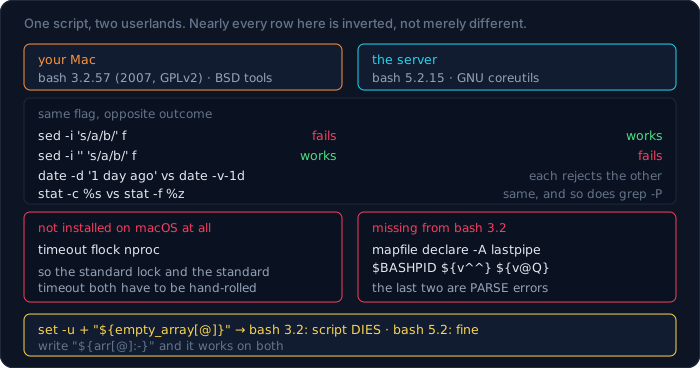
The sed -i pair is the classic: BSD sed reads the next argument as the backup suffix, GNU sed treats it as the script. There is no spelling that works on both — which is why portable scripts write to a temp file and move it, or just require GNU tools and check for them at the top.
And bash itself. Eight features, tested on both:
| bash 3.2 (macOS) | bash 5.2 (debian) | |
|---|---|---|
$BASHPID |
empty | 8 |
shopt -s lastpipe |
invalid option | supported |
mapfile / readarray |
not a command | works |
declare -A (associative arrays) |
not supported | works |
${var^^} |
bad substitution | ABC |
${var@Q} |
bad substitution | 'a b' |
set -u + "${empty[@]}" |
unbound variable | fine |
The two bad substitution rows are the worst, because they are parse errors. The script doesn't fail at that line — it fails to start.
Which binary actually runs?
This is the portability question people forget, and this machine happens to be a perfect example. Ask three ways:
grep --version         → ugrep 7.5.0
type grep              → grep is a shell function
which grep             → /usr/bin/grep
inside `bash -c`       → grep (BSD grep, GNU compatible) 2.6.0-FreeBSD
Four answers, all correct, all different. A tool wrapper had installed a shell function named grep. which is an external program: it cannot see functions or aliases, so it confidently reports a binary that never runs interactively. type and command -v are builtins and know the truth. And a child bash -c — which is what your script is — sees neither the function nor the alias, so it got the system binary with completely different flag support.
The resolution order, demonstrated by removing one layer at a time:
echo() { command echo "FUNCTION says: $*"; }
alias echo='command echo ALIAS says:'
echo hello               → ALIAS says: hello
unalias echo; echo hello → FUNCTION says: hello
unset -f echo; echo hello → hello        (the builtin)
Alias, then function, then builtin, then $PATH. When a command behaves differently in your terminal than in your script, this list is the first thing to walk — and type -a name prints all of it at once.
Two deploys at the same time
The obvious lock is a race, and the race is not narrow. Forty processes, each trying to take one lock:
if [ ! -f "$LOCK" ]; then touch "$LOCK"; echo won >> "$WIN"; fi
| method | winners out of 40 |
|---|---|
[ ! -f lock ] then touch |
6, 9, 10 (three runs) |
mkdir "$LOCK" |
1, 1, 1 |
set -o noclobber; : > "$LOCK" |
1, 1, 1 |
ln -s $$ "$LOCK" |
1, 1, 1 |
Between the test and the touch there is a window, and a quarter of the racers fit inside it. The three that work all do their test and their write in a single system call that the kernel guarantees is atomic. mkdir is the most portable of them — and note that flock, the tool most lock tutorials reach for, is not installed on macOS at all.
The usable shape, with the stale-lock problem handled:
LOCK=/tmp/deploy.lock
if ! mkdir "$LOCK" 2>/dev/null; then
    echo "another deploy is running (pid $(cat "$LOCK/pid" 2>/dev/null))" >&2
    exit 1
fi
echo $$ > "$LOCK/pid"
trap 'rm -rf "$LOCK"' EXIT
The PID inside is what saves you after a kill -9, which — as measured above — leaves the lock behind.
A timeout when there is no timeout
with_timeout() {
    local secs=$1; shift
    "$@" & local pid=$!
    ( sleep "$secs"; kill -TERM "$pid" 2>/dev/null ) & local watcher=$!
    local rc=0
    wait "$pid" 2>/dev/null || rc=$?
    kill -TERM "$watcher" 2>/dev/null
    wait "$watcher" 2>/dev/null || true
    return $rc
}
with_timeout 1 sleep 5  → rc=143   (128+15: it was killed)
with_timeout 5 true     → rc=0
Killing the watcher afterwards is the part people leave out, and without it a fast command still leaves a sleep running that fires a kill at a PID that may have been reused.
Retry belongs next to it, and reads better as a wrapper than as a loop copied three times:
retry() {
    local n=$1 i=1 delay=1; shift
    while true; do
        if "$@"; then return 0; fi
        [ "$i" -ge "$n" ] && return 1
        sleep "$delay"; delay=$((delay * 2)); i=$((i + 1))
    done
}
retry 5 flaky   → succeeded on attempt 3
retry 3 always_fails → gave up after 3 attempts
Exit codes worth recognising
127  command not found
126  found, not executable
130  killed by SIGINT   (128 + 2)   — Ctrl-C
137  killed by SIGKILL  (128 + 9)   — the OOM killer, or kill -9
141  SIGPIPE            (128 + 13)  — wrote into a closed pipe
143  killed by SIGTERM  (128 + 15)  — docker stop, systemd
137 is the one to memorise: a container that exits 137 was killed, usually by the OOM killer, and no amount of reading its application log will show you why. This site's own deploy hit exactly that when two Docker builds ran in parallel on a 6 GB VPS, and the fix was in the deploy script — build sequentially — not in the application.
Arguments: getopts, and where it stops
Hand-rolled argument parsing is where deploy scripts accumulate their weirdest bugs, usually a shift in the wrong branch. getopts is a builtin, it is POSIX, and it is about ten lines:
parse() {
    local OPTIND=1 opt env="" force=0 tag=""
    while getopts ":e:ft:" opt; do
        case "$opt" in
            e) env=$OPTARG ;;
            f) force=1 ;;
            t) tag=$OPTARG ;;
            :)  echo "-$OPTARG needs an argument"; return 2 ;;
            \?) echo "unknown option -$OPTARG";    return 2 ;;
        esac
    done
    shift $((OPTIND - 1))
    echo "env=$env force=$force tag=$tag  rest=[$*]"
}
parse -e prod -f -t v1.2 extra.txt  → env=prod force=1 tag=v1.2 rest=[extra.txt]
parse -e                            → -e needs an argument
parse -x                            → unknown option -x
parse --long-option                 → unknown option --
Three details do the work. The leading : in ":e:ft:" turns on silent error mode, which is what makes the : and \? branches reachable instead of bash printing its own message. local OPTIND=1 is mandatory when parsing inside a function — OPTIND is global and a second call would resume where the first stopped. And shift $((OPTIND - 1)) leaves the non-option arguments in "$@".
The last line of the output is the limitation: getopts has no idea what --long-option is. It sees --, treats it as the end of options, and stops. If you want --verbose, you are writing a while case loop by hand — which is fine, and is what most deploy scripts end up doing:
while [ $# -gt 0 ]; do
    case "$1" in
        --no-build) NO_BUILD=true; shift ;;
        --tag)      TAG=$2; shift 2 ;;
        --)         shift; break ;;
        -*)         echo "unknown: $1" >&2; exit 2 ;;
        *)          break ;;
    esac
done
The -- branch is the one people leave out, and it is how a caller passes a filename that starts with a dash.
When it breaks at 3am: set -x
set -x prints each command after expansion, which is usually enough on its own:
+ x=1
+ y=2
+ for i in a b
+ : a
+ for i in a b
+ : b
Useful, and unusable in a 700-line script, because nothing tells you where you are. PS4 fixes that, and almost nobody changes it:
export PS4='+ ${BASH_SOURCE##*/}:${LINENO}:${FUNCNAME[0]:-main}: '
+ ps4demo.sh:3:main: x=1
+ ps4demo.sh:4:main: y=2
+ ps4demo.sh:5:main: for i in a b
+ ps4demo.sh:6:main: : a
+ ps4demo.sh:5:main: for i in a b
+ ps4demo.sh:6:main: : b
File, line and function on every line — including the loop jumping back to line 5, which is how you see iteration boundaries without adding a single echo. Three ways to reach for it:
bash -x deploy.sh— no edit to the script at all.set -x…set +xaround the suspect region, when the whole trace is too much.PS4plusBASH_XTRACEFDto send the trace to a file descriptor instead of stderr, so it doesn't interleave with the output you're reading.
Pair it with the ERR trap from the header block, which reports the line and the command without needing the trace at all:
trap 'echo "failed at line $LINENO: $BASH_COMMAND" >&2' ERR
$BASH_COMMAND is the command that was running when the trap fired — the single most useful variable in shell debugging, and it only exists inside a trap.
The cd that didn't happen
The most famous shell disaster:
cd "$BUILD_DIR"
rm -rf ./*
If cd fails, rm -rf ./* runs somewhere else. Measured in a sandbox with four files, where $BUILD_DIR does not exist:
| files left | |
|---|---|
no set -e |
0 |
set -e |
4 |
set -euo pipefail |
4 |
cd "$BUILD_DIR" || exit 1, no set -e |
4 |
And here is the correction I owe this section. I was going to write it the way it's usually written — always put || exit after cd, because set -e won't save you. set -e saves you completely. A failing cd is an ordinary non-zero exit at the top level of the script, which is precisely the case set -e handles.
shellcheck agrees, and demonstrates it by staying quiet:
without set -e  → SC2164: Use 'cd ... || exit' in case cd fails
with set -euo pipefail  → (nothing)
Which reframes the whole set -e argument. All the sections above are about places set -e does not cover — but this is the one that deletes a directory, and there it works. Keep set -euo pipefail, and write cd … || exit anyway inside functions and subshells, where a bare cd sits in the gap.
Reading a real deploy script
The 734-line deploy.sh that ships this site, as an example of what the above looks like at full size.
It opens the expected way, then does something that looks like a mistake and isn't:
set -euo pipefail
if [ -f "$VPS_ENV_FILE" ]; then
    set +e
    while IFS='=' read -r key value; do
        [ -z "$key" ] && continue
        case "$key" in '#'*) continue ;; esac
        if [[ "$key" =~ ^[A-Za-z_][A-Za-z0-9_]*$ ]]; then
            export "${key}=${value}"
        fi
    done < "$VPS_ENV_FILE"
    set -e
fi
set +e for the duration of the loop, then back on. Both of the guards in there — [ -z "$key" ] && continue and the case — are && chains and continues whose exit status is 1 on the common path, exactly the pattern from the first section. Rather than rewrite five lines into if blocks, the script turns -e off for one loop and back on immediately. That's a legitimate use, and the pairing is what makes it safe: set +e without a matching set -e is how a script ends up with no error handling at all from line 200 onwards.
It also encodes an incident as a runtime check rather than a comment:
info "Smoke-testing core API routes are mounted..."
for route in gifs messages/threads profile social/posts …; do
    code=$(curl -s -o /dev/null -w '%{http_code}' "$BASE/$route")
    [ "$code" = 404 ] && smoke_failed=true
done
A route that 404s unauthenticated means the router was never mounted, which means the image is stale — a real failure mode here, where a partial build once shipped a dist/ that silently dropped an endpoint while the container reported healthy. The health check answered "yes"; the smoke test is the one that would have said no.
Running shellcheck 0.11.0 over the whole file:
5 findings, all SC2016: "Expressions don't expand in single quotes"
All five are single-quoted node -e '…' programs where $ belongs to JavaScript. That's the normal end state of a linted script: what's left is the false positives, and you should be able to say why each one is there.
What shellcheck catches, and what it doesn't
Fed a script containing the bugs from this guide:
SC2086  Double quote to prevent globbing and word splitting     ✓
SC2155  Declare and assign separately to avoid masking return values  ✓
SC2045  Iterating over ls output is fragile. Use globs          ✓
SC2162  read without -r will mangle backslashes                 ✓
SC2030  Modification of count is local (to subshell caused by pipeline)  ✓
SC2031  count was modified in a subshell. That change might be lost      ✓
Six of the traps above, caught by a linter that runs in under a second. Install it; there is no argument on the other side.
Now the honest part. Given this, under set -euo pipefail:
OK=false
[ "$OK" = false ] && echo "not ok"
shellcheck output: (nothing)
The bug that actually took this site's deploy down is not detected. Neither is a trap that silently replaces an earlier one, nor an ERR trap that will never fire because -E is missing, nor $? clobbered on the first line of a handler. A linter checks the shapes it knows; the semantics in this guide are mostly interactions — between a flag, a syntactic position, and which shell you are on — and those are what running the thing is for.
A structure that survives being edited at 3am
Everything above is about individual traps. The shape of the file decides how many of them you meet.
Everything is a function, and nothing runs at import time. A script whose top level is 700 sequential commands cannot be tested, sourced, or partially re-run. A script whose top level is one line can:
main() {
    preflight
    sync_code
    build_images
    swap_containers
    smoke_test
}
main "$@"
main "$@" at the bottom, and the quoting matters for the reason measured earlier — bare $@ re-splits your arguments.
Fail loudly at the top, not quietly in the middle. Every external tool and every required variable gets checked before anything is modified:
for tool in docker rsync ssh node; do
    command -v "$tool" >/dev/null || { echo "missing: $tool" >&2; exit 1; }
done
: "${DATABASE_URL:?must be set}"
${VAR:?message} is the compact form and it respects set -u properly — it exits with the message instead of the generic "unbound variable".
Make the checks part of the script, not part of the runbook. This site's deploy runs a content validator and a route smoke test as steps, and fails the deploy when they fail. A check that lives in a wiki page is a check that runs when someone remembers.
Log with timestamps, to stderr, through one function. Four one-liners near the top of deploy.sh, and every message in 734 lines goes through them:
info() { echo "[$(date '+%H:%M:%S')] [INFO]  $*"; }
ok()   { echo "[$(date '+%H:%M:%S')] [OK]    $*"; }
fail() { echo "[$(date '+%H:%M:%S')] [FAIL]  $*" >&2; }
The timestamps are what let you say "the frontend build took 458 seconds" afterwards instead of guessing, and one function means changing the format is one edit.
Comment the why, especially for the workarounds. The two comments quoted earlier in this guide — the one explaining why a check is an if rather than an && chain, and the one explaining why the smoke test only lists param-less GET routes — are each about five lines, and each prevents a specific outage from being reintroduced by a reasonable-looking simplification. A shell script is exactly the kind of file where someone "tidies up" a construct they don't recognise.
What I got wrong measuring this
Seven, and the first is the one I'd have published with confidence.
- "
set -ewon't save you fromcd $DIR; rm -rf ./*, so always writecd … || exit." It saves you completely: 4 files survived withset -e, 0 without. The advice is right for functions and subshells and wrong as stated for a top-level script — and shellcheck already encodes the distinction by suppressing SC2164 whenset -eis on. I'd have repeated the internet's version. - "
set -emakes a function stop at its first failing command." Not when the function is used as a condition.if f; thendisables-efor the entire body, sofalse; echo INSIDEprintedINSIDE. Every "check the environment" helper called from anifis running with error handling off. - "
pipefailis strictly an improvement."yes | head -1returns 141 underset -e -o pipefailand kills the script. Anyproducer | headis a landmine, and so is anygrepthat legitimately matches nothing. It's still worth turning on; it is not free. - "
whichtells you which binary will run." On this machinewhich grepsays/usr/bin/grepwhile typinggrep --versionprintsugrep 7.5.0, because a shell function shadows it — andwhich, being an external program, cannot see functions.type -ais the one that answers the question. - "
for f in $(ls)versus a glob is a style preference." Three files, three arguments from the glob, six from$(ls). And witha=("one two" "three" ""), quoted and unquoted${a[@]}both produce argc=3 — the same count, different data, which is worse than a crash. - "A test-then-create lock is fine because the window is microscopic." 40 racers, 6 to 10 winners across three runs. The window is not microscopic; it's a scheduler quantum, and every parallel CI job is inside it.
- "shellcheck would have caught these." It caught six of them cleanly. It did not catch the one that actually broke production here, and cannot catch the trap-replacement or ERR-inheritance bugs either.
The pattern: five of the seven are cases where a rule is conditionally true — true for a top-level statement but not inside a function, true for bash 5 but not bash 3.2, true unless the last line happens to be an && chain. Shell has very few unconditional rules, and advice that drops the condition is how a script works for a year and then deletes something.
The header worth copying
#!/usr/bin/env bash
set -Eeuo pipefail          # -E so the ERR trap reaches functions
IFS=$'\n\t'                 # optional: stop splitting on spaces

SCRIPT_DIR=$(cd -- "$(dirname -- "${BASH_SOURCE[0]}")" && pwd)
WORK=$(mktemp -d)
trap 'rc=$?; rm -rf "$WORK"; exit $rc' EXIT
trap 'echo "failed at line $LINENO: $BASH_COMMAND" >&2' ERR

command -v docker >/dev/null || { echo "docker missing" >&2; exit 1; }
| Symptom | Cause |
|---|---|
| script continued after a step failed | the step was in if, &&, || or ! — set -e skips those |
| a whole function ran despite failures | the function was called as a condition |
| deploy fails when everything is healthy | last line is an && chain with a false left side |
| an empty variable that should have failed | local x=$(cmd) — declare and assign on separate lines |
| pipeline reports success but a stage failed | no set -o pipefail |
script dies on a working producer | head |
pipefail + SIGPIPE (141) |
script dies on a grep that found nothing |
grep exits 1; { grep … || true; } |
counter is 0 after a while read loop |
the loop was a pipeline stage; use < <(...) |
| works on the server, dies on the Mac | bash 3.2 vs 5.x, or BSD vs GNU flags |
[: too many arguments |
unquoted variable in [ ]; use [[ ]] |
| last line of a file never processed | read returns 1 at EOF; add || [ -n "$line" ] |
| temp dir left behind | cleanup wasn't in a trap … EXIT, or the process got kill -9 |
| two deploys ran at once | test-then-create lock; use mkdir |
| container exited 137 | killed — usually OOM. Look at memory, not the app log |
which and reality disagree |
a function or alias shadows the binary; use type -a |
Where to go next
- How to Use the Command Line in Linux and macOS — the prerequisite: pipes, streams, exit codes and quoting, at the level this guide assumes.
- Exp Hub — the snippets these patterns came from, in runnable form: locks, retries, health-check loops, portable timeouts.
- Code Lab — graded exercises on the Linux track, including the one where a script reports success after the step that mattered failed.
Bài liên quan
Chuyên sâu
Tôi tự xây một công cụ kiểu Jira: CT Work sau 21 ngày, 113 commit và mười lỗi đã trả giá
Nhật ký kỹ thuật của CT Work, công cụ quản lý dự án và đồ án sinh viên FPT dùng thật: kiến trúc và mã thật, AI agent qua MCP, số đo bằng lệnh (243 model, 68 trang, 1.514 ca test), mười lỗi đã sửa, mẹo dùng — và khi nào không nên dùng.
Chuyên sâu
AI Code: agent lập trình trong app desktop — cách dựng, lỗi đã gặp, và cách dùng cho đáng tiền
Agent lập trình trong app desktop CuongThai: kiến trúc và mã thật, 174 commit trong 48 ngày, 9 lỗi đã gặp và cách sửa, vì sao giá một lượt không nói lên giá trong vòng lặp gọi tool, mẹo chọn model — và khi nào KHÔNG nên dùng.
Chuyên sâu
Mã hoá cho lập trình viên: AES, RSA, chữ ký số — và vì sao đừng bao giờ tự viết thuật toán
Bắt đầu từ một file bài thi .dat mở ra không được: entropy 7,99 nói lên điều gì, vì sao dò khoá AES là bất khả thi về mặt VẬT LÝ chứ không phải "rất khó", AES khác RSA ra sao (đo thật: chênh ~1.520 lần). Kèm thí nghiệm ECB làm lộ nguyên hình ổ khoá và sáu vụ sập kinh điển.
Chuyên sâu
Có bao nhiêu loại cơ sở dữ liệu — và chọn cái nào cho việc gì
"SQL hay NoSQL" là phép chia sai: một vế là ngôn ngữ, vế kia nghĩa đen là "không phải cái kia". Bài này chia lại theo mô hình dữ liệu (11 loại), theo tải công việc và theo cách triển khai; giải thích ACID, mức cô lập, write skew, CAP bị hiểu sai ở đâu, B-tree so với LSM-tree; kèm cây quyết định, mười sai lầm hay gặp, và hồ sơ thật của chính trang này — 248 bảng trên một Postgres, một VPS 6GB.
Bình luận